
Bring your own S3
On most Git hosts the provider stores your Git objects, so you do not really own the data. Leaving means an export and a migration. Many of those hosts also train AI models on repository contents. Amendable does not. You still clone and push against Amendable, but Git objects can live in Amendable’s S3 bucket or in an Amazon S3 bucket you own (bring-your-own storage, Pro). Storage overage is $0.25 per GiB-month in your bucket versus $0.50 on managed storage. See Usage and quotas.
Amendable keeps caches on its servers so clones stay fast. The durable copy is in the bucket. You do not have to trust us with the only copy: keep it in a bucket you own. Revoke the IAM role or deny S3 access and Amendable cannot read or write those objects. You can cut access at any time. A warm node may still serve a clone from cache after you cut access, until that cache goes cold. Cold nodes talk to the bucket again. Because the objects are in your bucket, you can also run your own pipeline on them: S3 notifications, inventory, replication, or webhooks when Git refs move. That is real data ownership.
An open source tool is coming soon that converts those layer tarballs into a normal .git directory on your machine. You will not need Amendable to reconstruct Git from objects you already own.
How Git is stored
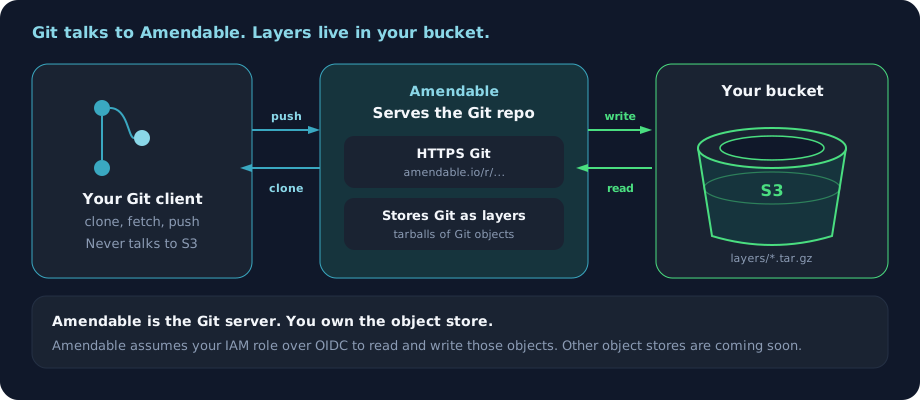
Section titled “How Git is stored”A hosted Git repo is the same kind of folder as .git on your laptop: objects, refs, and a few metadata files. Amendable does not keep that folder on one machine’s disk. Each Git push (and repo create) becomes an immutable layer: a tarball of only what changed. Those tarballs stack. A later clone pulls the chain, and Amendable serves ordinary Git over HTTPS. Your Git client never talks to S3. Amendable does.
Every 10 layers Amendable writes a snapshot: a full Git tree, not a diff. Later mounts start from that snapshot plus the pushes after it, so they do not walk an endless chain.
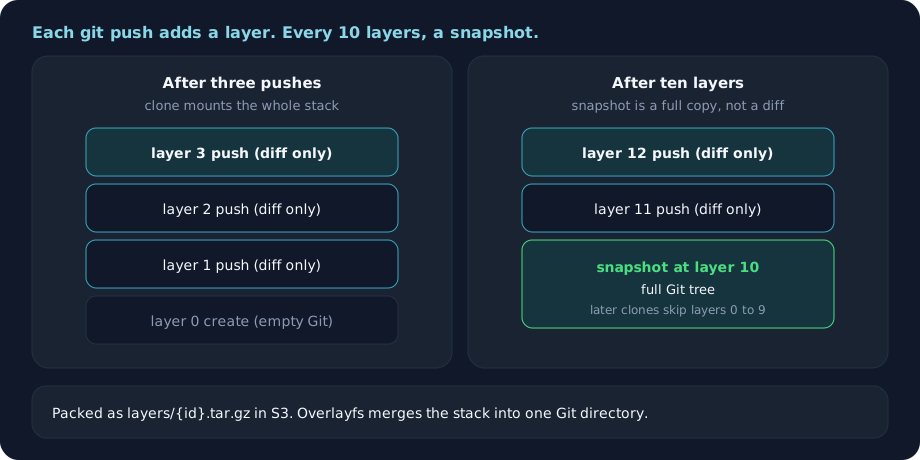
The merge uses Linux overlayfs: older layers are read-only lower directories, the new layer is the writable upper directory (only files this push changed). That upper dir is packed into {prefix}layers/{layer-id}.tar.gz in S3. Same stacking idea as container image layers.
A force-push that rewrites Git history still writes a new layer. Earlier layers stay. Clones serve the current tip. The layer chain is the auditable history: who changed the repository, and the files they wrote, even when git log no longer shows it.
Those tarballs are the repository. Amendable does not keep another durable copy. A cold node reconstructs Git from those objects. A warm node may still clone from cache. Treat the keys as production data. The longer design write-up is How BeanHub works: layer-based Git repos. BeanHub and Amendable share this engine.
1. Copy the setup payload
Section titled “1. Copy the setup payload”UI: Settings → Bring-your-own storage
API (needs API_STORAGE):
curl -sS https://api.amendable.io/v1/storage-buckets/oidc-setup \ -H "Authorization: Bearer $AMENDABLE_TOKEN"Fields you must use as-is:
| Field | Example |
|---|---|
issuer |
https://oidc.amendable.io |
audience |
amendable-byo-storage |
subject |
account:<your-user-uuid> |
sample_trust_policy |
IAM trust JSON with the correct hostname |
Always copy issuer, audience, and subject from this payload. Do not invent them.
subject is account: plus your user UUID, not your username.
2. Bucket
Section titled “2. Bucket”- Any AWS region
- Block public access
- SSE-S3 is enough
- Prefix, default
amendable/ - Do not use names that look like platform buckets (
amendable-repos-*,amendable-download-*)
3. IAM OIDC provider and role
Section titled “3. IAM OIDC provider and role”The AWS console is the easiest path. No extra tools. Use the AWS CLI if you already have aws. Terraform is for when you already manage AWS as code.
Sign in at https://console.aws.amazon.com/. Copy issuer, audience, and subject from the setup payload first. IAM fetches the OIDC thumbprint for you in the console, so you do not paste it.
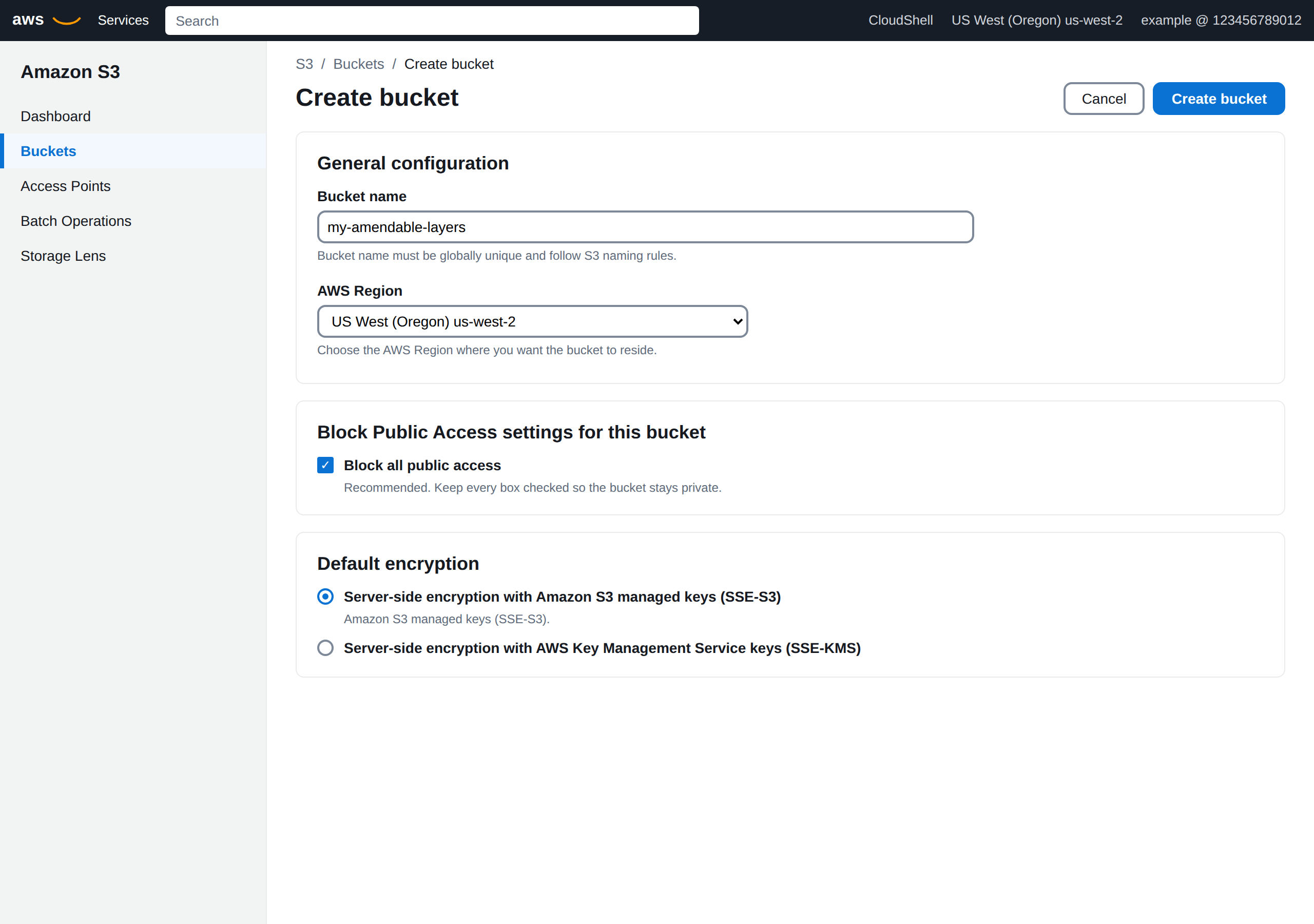
Open S3 → Create bucket. Name it something like my-amendable-layers. Choose the AWS region where you want the bucket. Keep Block all public access on. Default encryption SSE-S3 is enough.
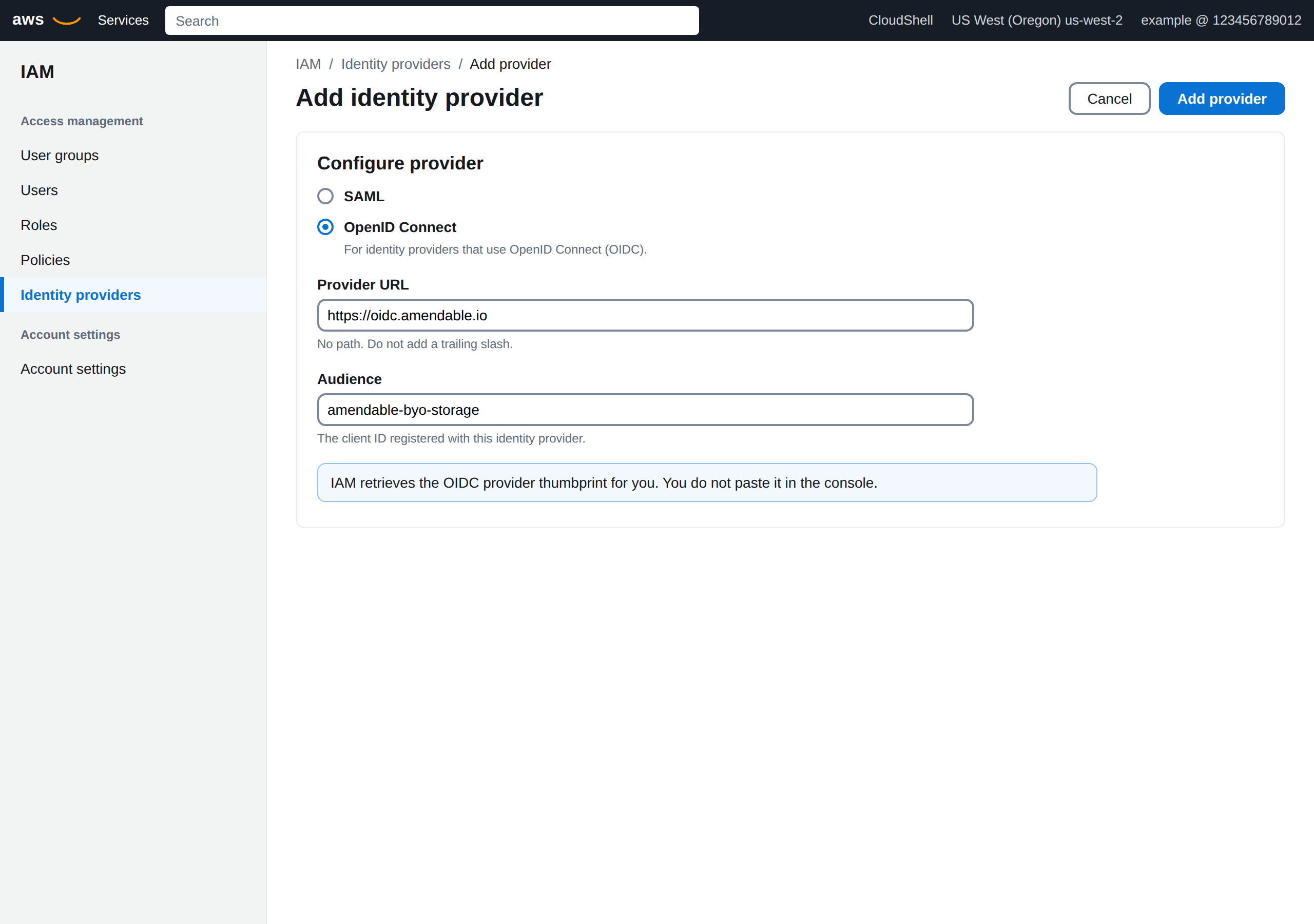
Open IAM → Identity providers → Add provider. Choose OpenID Connect. Provider URL is https://oidc.amendable.io with no path and no trailing slash. Audience is amendable-byo-storage. Then Add provider.
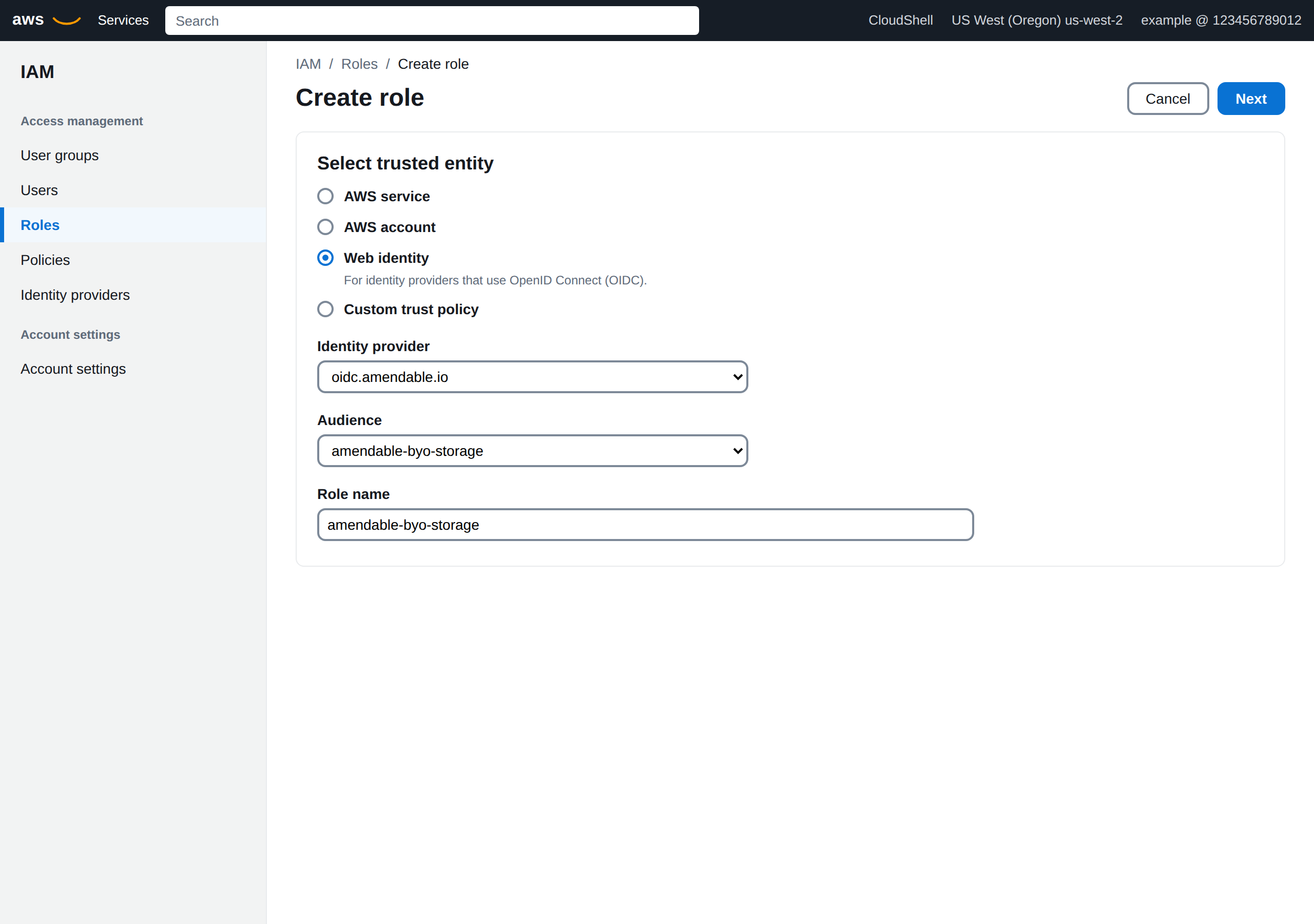
IAM → Roles → Create role → Web identity. Identity provider oidc.amendable.io, audience amendable-byo-storage. Skip AWS managed policies. Name the role amendable-byo-storage.
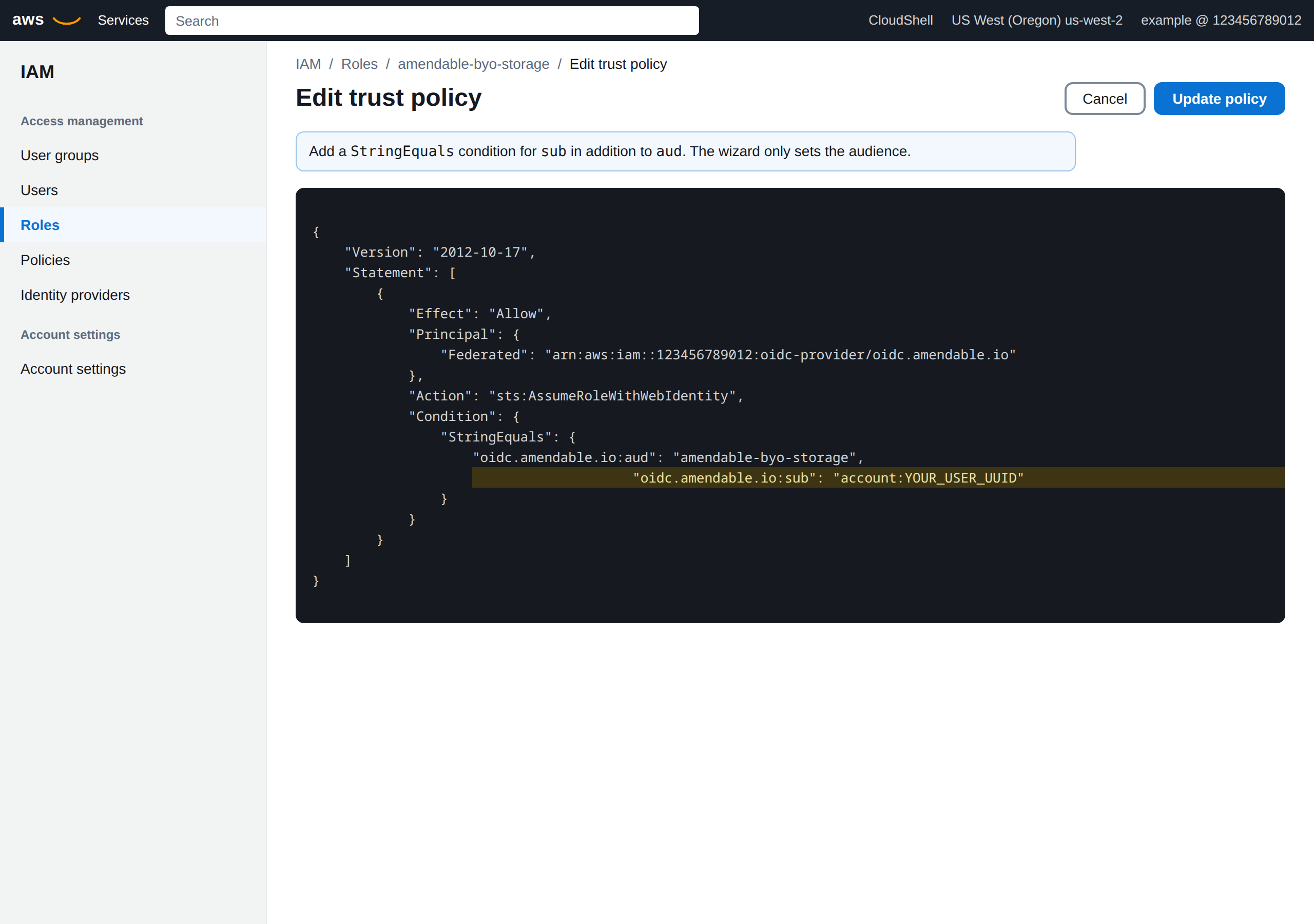
The wizard only binds aud. Open the role → Trust relationships → Edit trust policy. Add oidc.amendable.io:sub equal to account:<uuid> from the setup payload. Leave the aud line as amendable-byo-storage.
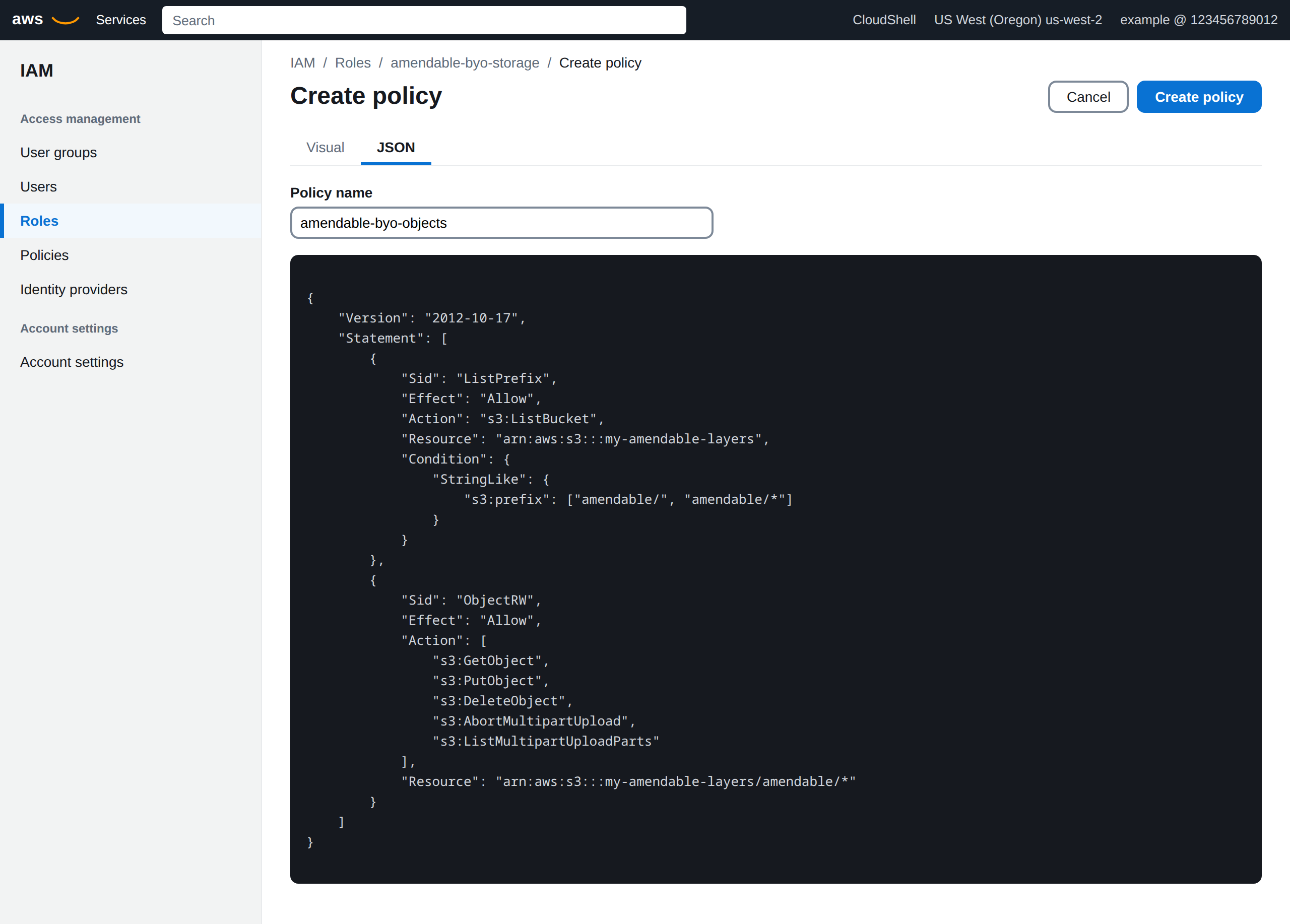
On the same role, Permissions → Add permissions → Create inline policy → JSON. Allow s3:ListBucket on the bucket with s3:prefix amendable/ and amendable/*, and object Get, Put, Delete, plus multipart, on bucket/amendable/*. Name the policy amendable-byo-objects. Copy the role ARN when you are done.
Install the AWS CLI and sign in. Copy issuer, audience, and subject from GET /v1/storage-buckets/oidc-setup. Then:
export ISSUER_HOST=oidc.amendable.ioexport BUCKET=my-amendable-layersexport ACCOUNT=123456789012export SUB=account:YOUR_USER_UUIDexport REGION=eu-west-1The script creates the bucket in $REGION (any AWS region), the OIDC identity provider, a role whose trust policy matches aud and sub, and S3 permissions on {prefix}* (canary + layers + multipart).
#!/usr/bin/env bash# Create an Amazon S3 bucket and IAM OIDC role for Amendable BYO storage.# Copy issuer, audience, and subject from GET /v1/storage-buckets/oidc-setup.set -euo pipefail
ISSUER_HOST="${ISSUER_HOST:-oidc.amendable.io}"BUCKET="${BUCKET:?set BUCKET}"ACCOUNT="${ACCOUNT:?set ACCOUNT to your 12-digit AWS account id}"SUB="${SUB:?set SUB to account:<your-user-uuid> from oidc-setup}"PREFIX="${PREFIX:-amendable/}"ROLE_NAME="${ROLE_NAME:-amendable-byo-storage}"REGION="${REGION:-us-west-2}"# SHA-1 of the current issuer TLS intermediate. Refresh if AWS rejects it.THUMBPRINT="${THUMBPRINT:-06b25927c42a721631c1efd9431e648fa62e1e39}"
if [ "$REGION" = "us-east-1" ]; then  aws s3api create-bucket --bucket "$BUCKET" --region "$REGION"else  aws s3api create-bucket \    --bucket "$BUCKET" \    --region "$REGION" \    --create-bucket-configuration LocationConstraint="$REGION"fi
aws s3api put-public-access-block \  --bucket "$BUCKET" \  --public-access-block-configuration \  BlockPublicAcls=true,IgnorePublicAcls=true,BlockPublicPolicy=true,RestrictPublicBuckets=true
aws s3api put-bucket-encryption \  --bucket "$BUCKET" \  --server-side-encryption-configuration \  '{"Rules":[{"ApplyServerSideEncryptionByDefault":{"SSEAlgorithm":"AES256"}}]}'
aws iam create-open-id-connect-provider \  --url "https://$ISSUER_HOST" \  --client-id-list amendable-byo-storage \  --thumbprint-list "$THUMBPRINT"
cat > /tmp/amendable-trust.json <<EOF{  "Version": "2012-10-17",  "Statement": [    {      "Effect": "Allow",      "Principal": {        "Federated": "arn:aws:iam::${ACCOUNT}:oidc-provider/${ISSUER_HOST}"      },      "Action": "sts:AssumeRoleWithWebIdentity",      "Condition": {        "StringEquals": {          "${ISSUER_HOST}:aud": "amendable-byo-storage",          "${ISSUER_HOST}:sub": "${SUB}"        }      }    }  ]}EOF
aws iam create-role \  --role-name "$ROLE_NAME" \  --assume-role-policy-document file:///tmp/amendable-trust.json
cat > /tmp/amendable-s3.json <<EOF{  "Version": "2012-10-17",  "Statement": [    {      "Sid": "ListPrefix",      "Effect": "Allow",      "Action": "s3:ListBucket",      "Resource": "arn:aws:s3:::${BUCKET}",      "Condition": {        "StringLike": {          "s3:prefix": ["${PREFIX}", "${PREFIX}*"]        }      }    },    {      "Sid": "ObjectRW",      "Effect": "Allow",      "Action": [        "s3:GetObject",        "s3:PutObject",        "s3:DeleteObject",        "s3:AbortMultipartUpload",        "s3:ListMultipartUploadParts"      ],      "Resource": "arn:aws:s3:::${BUCKET}/${PREFIX}*"    }  ]}EOF
aws iam put-role-policy \  --role-name "$ROLE_NAME" \  --policy-name amendable-byo-objects \  --policy-document file:///tmp/amendable-s3.json
echo "role_arn=arn:aws:iam::${ACCOUNT}:role/${ROLE_NAME}"echo "bucket_name=${BUCKET}"echo "key_prefix=${PREFIX}"
The thumbprint in that example is the one used against the current issuer chain. If AWS starts rejecting it, refresh from the issuer TLS chain (SHA-1 of the top intermediate CA).
Use Terraform only if you already manage AWS as code. This module uses the AWS provider.
Save this as main.tf in your own repo. It creates the bucket, the OIDC provider for oidc.amendable.io, a role whose trust policy matches aud and sub, and S3 permissions on {prefix}* (canary + layers + multipart).
terraform {  required_version = ">= 1.5.0"  required_providers {    aws = {      source  = "hashicorp/aws"      version = ">= 5.0"    }  }}
variable "aws_account_id" {  type        = string  description = "Your AWS account id."}
variable "bucket_name" {  type        = string  description = "S3 bucket for Amendable layer objects."}
variable "aws_region" {  type        = string  description = "AWS region for the S3 bucket."  default     = "us-west-2"}
variable "amendable_user_id" {  type        = string  description = "Amendable user UUID from GET /v1/storage-buckets/oidc-setup (subject is account:<uuid>)."}
variable "issuer_host" {  type        = string  description = "OIDC issuer hostname. Default oidc.amendable.io."  default     = "oidc.amendable.io"}
variable "key_prefix" {  type        = string  description = "Object prefix Amendable will use. Include the trailing slash."  default     = "amendable/"}
variable "role_name" {  type    = string  default = "amendable-byo-storage"}
provider "aws" {  region = var.aws_region}
resource "aws_s3_bucket" "amendable" {  bucket = var.bucket_name}
resource "aws_s3_bucket_public_access_block" "amendable" {  bucket                  = aws_s3_bucket.amendable.id  block_public_acls       = true  block_public_policy     = true  ignore_public_acls      = true  restrict_public_buckets = true}
resource "aws_s3_bucket_server_side_encryption_configuration" "amendable" {  bucket = aws_s3_bucket.amendable.id  rule {    apply_server_side_encryption_by_default {      sse_algorithm = "AES256"    }  }}
resource "aws_iam_openid_connect_provider" "amendable" {  url             = "https://${var.issuer_host}"  client_id_list  = ["amendable-byo-storage"]  thumbprint_list = ["06b25927c42a721631c1efd9431e648fa62e1e39"]}
data "aws_iam_policy_document" "trust" {  statement {    effect  = "Allow"    actions = ["sts:AssumeRoleWithWebIdentity"]    principals {      type        = "Federated"      identifiers = [aws_iam_openid_connect_provider.amendable.arn]    }    condition {      test     = "StringEquals"      variable = "${var.issuer_host}:aud"      values   = ["amendable-byo-storage"]    }    condition {      test     = "StringEquals"      variable = "${var.issuer_host}:sub"      values   = ["account:${var.amendable_user_id}"]    }  }}
resource "aws_iam_role" "amendable" {  name               = var.role_name  assume_role_policy = data.aws_iam_policy_document.trust.json}
data "aws_iam_policy_document" "bucket" {  statement {    sid     = "ListPrefix"    effect  = "Allow"    actions = ["s3:ListBucket"]    resources = [      aws_s3_bucket.amendable.arn,    ]    condition {      test     = "StringLike"      variable = "s3:prefix"      values = [        var.key_prefix,        "${var.key_prefix}*",      ]    }  }
  statement {    sid    = "ObjectRW"    effect = "Allow"    actions = [      "s3:GetObject",      "s3:PutObject",      "s3:DeleteObject",      "s3:AbortMultipartUpload",      "s3:ListMultipartUploadParts",    ]    resources = [      "${aws_s3_bucket.amendable.arn}/${var.key_prefix}*",    ]  }}
resource "aws_iam_role_policy" "bucket" {  name   = "amendable-byo-objects"  role   = aws_iam_role.amendable.id  policy = data.aws_iam_policy_document.bucket.json}
output "role_arn" {  value = aws_iam_role.amendable.arn}
output "bucket_name" {  value = aws_s3_bucket.amendable.bucket}
output "key_prefix" { value = var.key_prefix}terraform initterraform apply \ -var aws_account_id=123456789012 \ -var aws_region=eu-west-1 \ -var bucket_name=my-amendable-layers \ -var amendable_user_id=YOUR_USER_UUIDThe thumbprint in that example is the one used against the current issuer chain. If AWS starts rejecting it, refresh from the issuer TLS chain (SHA-1 of the top intermediate CA).
Minimum object actions: s3:GetObject, s3:PutObject, s3:DeleteObject, s3:AbortMultipartUpload, s3:ListMultipartUploadParts.
Verify writes {prefix}.amendable-canary/{uuid}.txt (Put, Head, Delete) then uses {prefix}layers/{layer-id}.tar.gz for Git.
4. Register and verify
Section titled “4. Register and verify”curl -sS -X POST https://api.amendable.io/v1/storage-buckets \ -H "Authorization: Bearer $AMENDABLE_TOKEN" \ -H "Content-Type: application/json" \ -d '{ "name": "prod-layers", "provider": "S3", "auth_mode": "OIDC", "bucket_name": "my-amendable-layers", "region": "eu-west-1", "key_prefix": "amendable/", "role_arn": "arn:aws:iam::123456789012:role/amendable-byo-storage", "is_default": true }'Status starts as PENDING_VERIFICATION. Then:
curl -sS -X POST \ https://api.amendable.io/v1/storage-buckets/BUCKET_ID/verify \ -H "Authorization: Bearer $AMENDABLE_TOKEN"Success: status is ACTIVE and last_validated_at is set. Failure: FAILED, flash or 422, and a row in Error log / GET /v1/storage-buckets/errors.
5. Bind a repository
Section titled “5. Bind a repository”Pass storage_bucket_id on create, or set the bucket as account default. Binding cannot change later. You cannot delete a bucket that still has repos.
What Verify does not prove
Section titled “What Verify does not prove”Verify checks assume-role (OIDC) and canary Put/Head/Delete. It does not prove:
- that
layers/*.tar.gzobjects still exist - that
GetObjectonlayers/is still allowed
If layer objects are missing or changed, Git on a cold node can 500 (LoadImageError, S3 404, or digest mismatch). A warm node may still clone from cache. The BYO error log may stay empty. Do not tidy {prefix}layers/*.tar.gz. See How Git is stored.
After IAM changes, click Verify again. That is the check that writes a readable error.
Error log
Section titled “Error log”GET /v1/storage-buckets/errors and Settings → BYO storage → Error log.
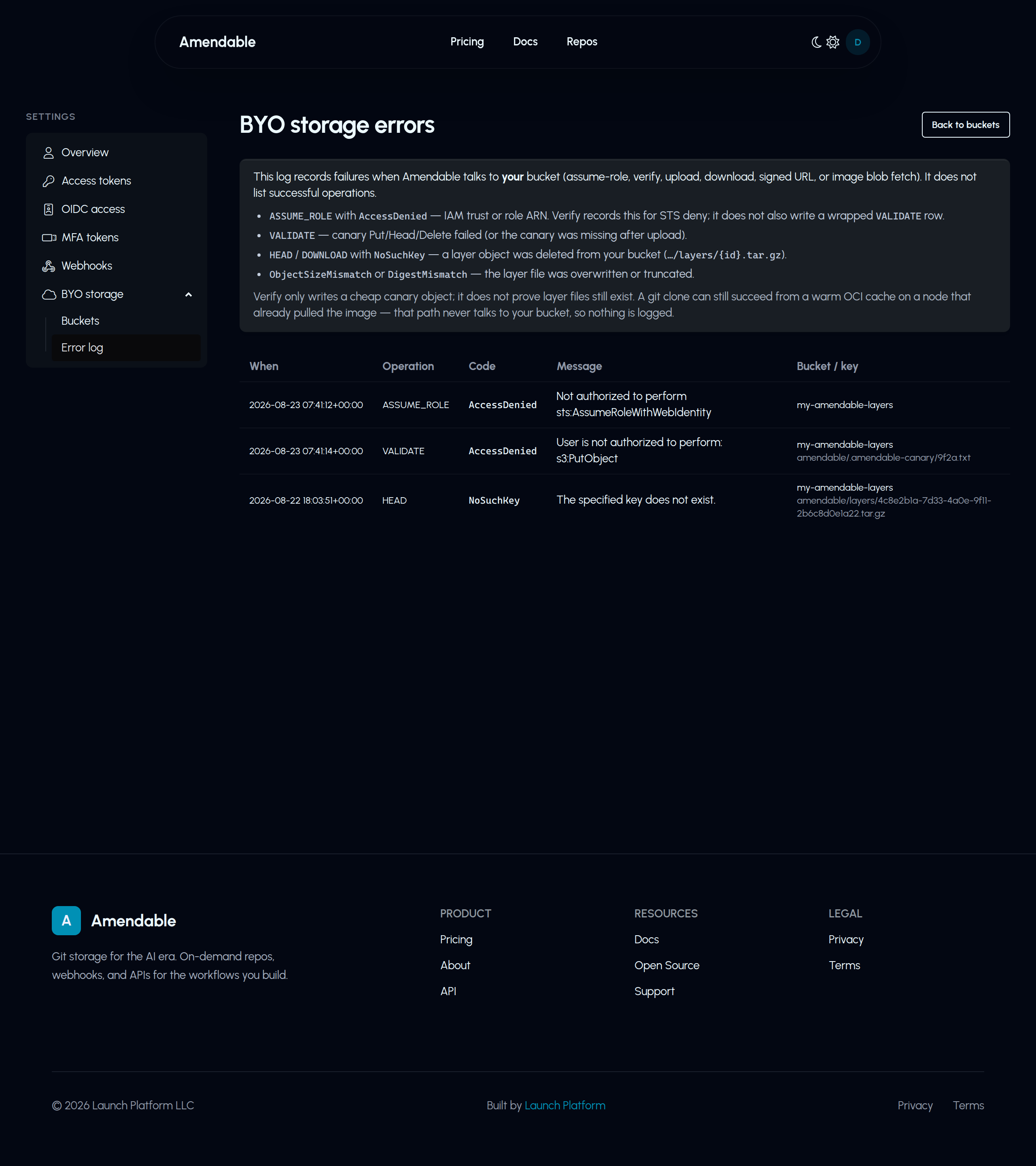
Operations you will see: ASSUME_ROLE, VALIDATE, UPLOAD, HEAD, and similar. Retention: 30 days / 500 rows per user.
Common Verify failures:
| Symptom | Cause |
|---|---|
AccessDenied on assume-role |
Trust iss host, aud, or sub mismatch; bad role ARN |
S3 AccessDenied on canary |
Missing Put/Head/Delete on {prefix}* |
| 422 OIDC required | Amazon S3 + static keys |
| 422 bucket name invalid | Platform bucket name |
| 403 | BYO requires Pro (feature flag) |